7 Best Open-Source Apps Every Student Should Have to Boost Learning
In 2026, studying is no longer limited to textbooks and classroom notes. Students now depend heavily on digital tools for writing assignments, managing time, memorizing concepts, and organizing study material. But one major problem remains—many popular learning apps are expensive or locked behind subscriptions.
This is where open-source apps become extremely powerful.
Open-source tools are free, transparent, and often built by global communities. They are especially useful for students because they provide high-quality features without forcing users to pay or compromise privacy. Many of these apps are also lightweight and work across Windows, macOS, Linux, and even Android.
Below are seven of the most useful open-source apps that can significantly improve learning, productivity, and focus.
1. LibreOffice – Complete Alternative to Paid Office Tools
One of the most essential apps for students is LibreOffice.
It is a full office suite that replaces paid tools like Microsoft Word, Excel, and PowerPoint. Students use it for writing assignments, creating presentations, making spreadsheets, and preparing project reports.
What makes LibreOffice powerful is its compatibility and flexibility. It supports multiple file formats and works completely offline, which is useful for students who may not always have stable internet access. It also includes tools like Writer (documents), Calc (spreadsheets), and Impress (presentations), making it a complete academic solution in one package.
For students on a budget, this is one of the most important tools to install first.
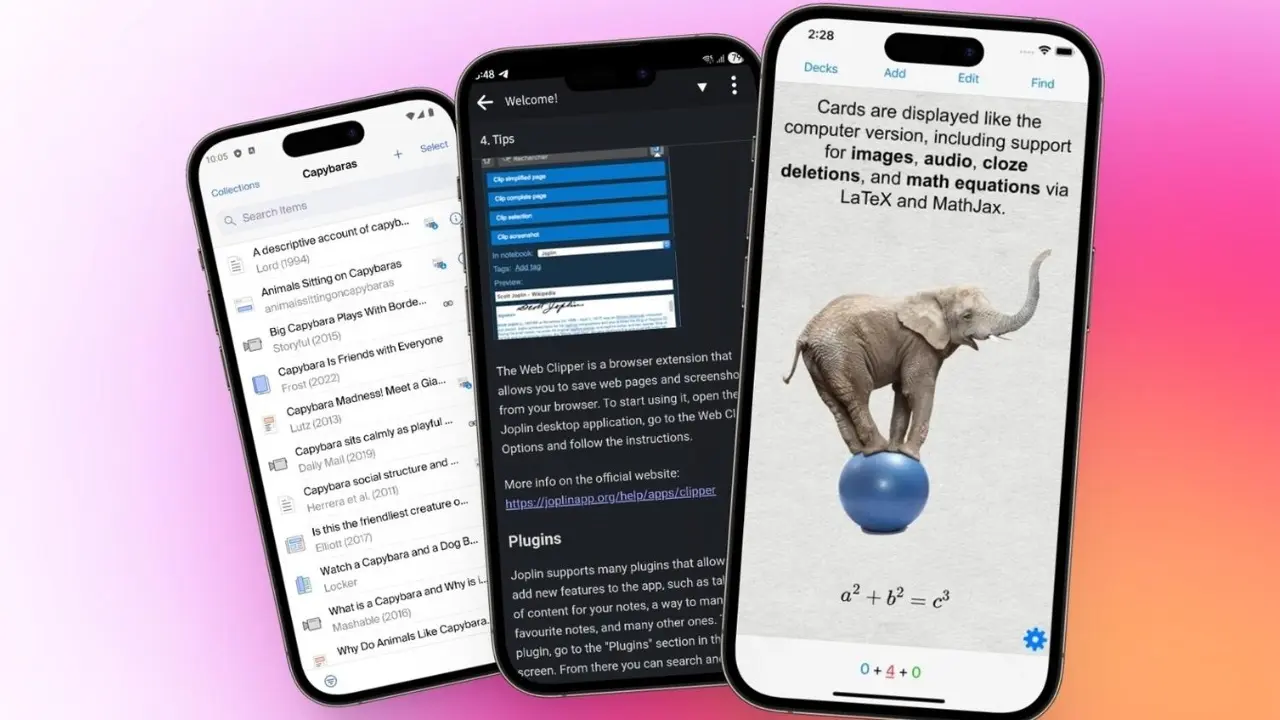
2. Anki – Smart Flashcards for Memory Learning
Studying is not just about reading—it is about remembering. That is exactly where Anki becomes extremely useful.
Anki uses a learning technique called spaced repetition, which shows you flashcards at scientifically spaced intervals. This helps your brain retain information for a longer time.
Students use Anki for:
- Language learning
- Medical and engineering studies
- Exam preparation
- Memorizing formulas and definitions
The biggest advantage of Anki is efficiency. Instead of repeatedly reading the same notes, students actively recall information, which improves memory retention significantly.
3. Mozilla Firefox – Private and Distraction-Free Browsing
Research is a huge part of modern education, and most students spend hours online. Mozilla Firefox is one of the best open-source browsers for learning.
Unlike many commercial browsers, Firefox focuses heavily on privacy and user control. It blocks trackers, reduces unwanted ads, and gives students a cleaner browsing experience.
For students, this means:
- Better focus during research
- Less distraction from ads
- Stronger privacy protection
- Faster access to academic resources
Firefox also supports extensions that can improve productivity, such as note-taking tools, grammar checkers, and study timers.
4. Thunderbird – Organize Emails and Academic Communication
Managing academic emails, internship updates, and project communication can become overwhelming. Mozilla Thunderbird helps students manage everything in one place.
It is an open-source email client that allows students to:
- Organize multiple email accounts
- Manage academic and personal emails separately
- Schedule messages
- Use extensions for productivity
Instead of constantly switching between browser tabs, students can manage all communication inside a single application.
This is especially useful for university students dealing with multiple departments, professors, and internship recruiters.
5. Kdenlive – Video Editing for Projects and Presentations
Modern education often includes video assignments, presentations, and creative projects. Kdenlive is a powerful open-source video editor that students can use for free.
It supports:
- Multi-track editing
- Video transitions and effects
- Audio adjustments
- High-quality exports
Students often use Kdenlive for:
- College presentations
- Project demonstrations
- Short educational videos
- Portfolio building
Instead of paying for expensive editing software, students can create professional-quality videos using this tool.
6. GIMP – Image Editing for Assignments and Design Work
Visual content is becoming more important in academic work. Posters, charts, and presentations often require image editing. GIMP is one of the most powerful free alternatives to Photoshop.
With GIMP, students can:
- Edit images for assignments
- Create posters and banners
- Design presentation visuals
- Adjust colors and layouts
It is widely used by design students, marketing learners, and anyone working on creative academic projects.
Despite being free, it offers advanced features like layers, filters, and plugins that make it highly professional.
7. VLC Media Player – Universal Learning Media Tool
Many students rely on video lectures, recorded classes, and educational content. VLC Media Player is one of the most reliable tools for playing almost any audio or video format.
It supports:
- All major video formats
- Subtitles for learning videos
- Playback speed control
- Lightweight performance
Students use VLC not just for entertainment but also for learning because it allows them to slow down lectures, repeat difficult sections, and study more effectively.
Why Open-Source Apps Are Better for Students
Open-source software offers several advantages that make it perfect for education:
1. Completely Free
No subscriptions or hidden charges.
2. Privacy-Focused
Most tools do not track user behavior or collect personal data.
3. Lightweight and Fast
Works well even on basic laptops and systems.
4. Highly Customizable
Students can adjust tools based on their learning style.
5. Community Support
Thousands of developers improve these tools continuously.
Final Thoughts
In today’s education system, having the right digital tools can make a major difference in how effectively a student learns and performs. Open-source apps provide a powerful advantage because they combine quality, accessibility, and affordability in one ecosystem.
From writing assignments in LibreOffice to memorizing concepts with Anki and editing projects with Kdenlive, these tools cover almost every academic need.
The biggest benefit is simple: students can focus more on learning instead of worrying about expensive software subscriptions.
As education continues to move toward digital learning, open-source apps will play an even bigger role in helping students study smarter, stay organized, and perform better in exams and real-world skills.
Disclaimer
This article is for informational and educational purposes only. Software features and availability may vary depending on device, operating system, and future updates.